Although public cloud providers eliminate the need for companies to manage physical, on-site infrastructure, organizations still need expertise to set up and maintain the cloud environment.
But Here comes the BIG question.

Hiring full stack developers is one of the biggest cost decisions for startups, SaaS companies, and growing digital businesses. Rates vary widely based on skills, experience, location, and hiring model, making it easy to overpay — or worse, hire the wrong talent.
This guide breaks down full stack developer hourly rates, total project costs, and smart hiring strategies so you can budget correctly and hire with confidence in 2026.
A full stack developer handles both frontend and backend development, often covering:
Because they can work across the entire application stack, full stack developers are highly valuable — and their rates reflect that.
| Experience Level | Hourly Rate (USD) |
|---|---|
| Junior (0–2 years) | $20 – $40 |
| Mid-Level (3–5 years) | $40 – $80 |
| Senior (5–8 years) | $80 – $150 |
| Lead / Architect | $150 – $300+ |
SEO tip: Searches like “hire senior full stack developer cost” and “full stack developer hourly rate” strongly favor tables and clear ranges like this.
Location is one of the biggest pricing factors.
| Region | Hourly Rate Range |
|---|---|
| North America (US, Canada) | $90 – $150+ |
| Western Europe (UK, Germany, France) | $70 – $130 |
| Eastern Europe | $35 – $80 |
| Latin America | $30 – $70 |
| India & Southeast Asia | $20 – $50 |
Key insight: Many startups choose Eastern Europe or Latin America to balance cost, timezone overlap, and quality.
| Project Type | Estimated Cost |
|---|---|
| Landing website | $2,000 – $6,000 |
| Startup MVP | $8,000 – $25,000 |
| SaaS platform | $30,000 – $120,000 |
| eCommerce website | $15,000 – $60,000 |
| Enterprise / AI-driven app | $100,000 – $500,000+ |
Costs increase with custom features, integrations, security, and scalability requirements.
Developers skilled in:
…command 20–50% higher rates.
More features = more hours:
Urgent projects cost more due to:
Unclear requirements are the #1 cause of budget overruns.
A strong mid-level developer often outperforms a weak senior one.
Use senior developers for architecture and juniors for execution.
Developers who understand SEO, speed, and scalability deliver higher ROI.
At Domloop, full stack development isn’t just about writing code — it’s about building fast, scalable, revenue-ready systems.
Clients choose Domloop for:
Whether you’re launching an MVP or scaling an established product, Domloop helps you control costs without sacrificing quality.
Hiring full stack developers in 2026 requires more than comparing hourly rates. The real cost lies in quality, scalability, and long-term maintainability.
👉 Expect to pay $40–150/hr for most professional full stack developers
👉 Budget $8,000–$120,000+ depending on project scope
👉 Choose teams that understand business goals, not just code
If you want predictable costs, faster delivery, and future-proof development, Domloop is built for that.
Want to know the cost of Custom Web Development in USA? Click here to find out.
For latest happening, news and updates for expats in Germany Click here
Hiring a full stack developer typically costs between $20 and $150+ per hour, depending on experience level, location, and project complexity.
Freelancers work well for short-term or small tasks, while agencies or dedicated development teams offer better reliability, scalability, and long-term support for growing businesses.
A full stack developer should be skilled in frontend frameworks, backend development, databases, APIs, cloud services, deployment, and performance optimization.
A basic MVP typically takes 4–8 weeks, while complex SaaS or enterprise applications can take several months depending on features and scope.
Yes. DomLoop provides full stack development services globally, offering flexible hiring models for startups, SaaS companies, and enterprises.

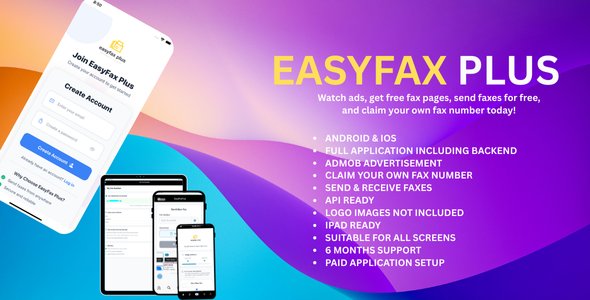
Send Premium Faxes Anywhere in the World with Minimalistic & Sleek Design.
Experience the ultimate faxing solution with a streamlined and elegant interface. Our platform combines simplicity with sophistication, allowing you to send premium faxes to any destination worldwide. Designed for efficiency and ease of use, it’s the perfect choice for modern professionals who demand style and functionality. Say goodbye to clunky fax machines and hello to a seamless, refined faxing experience.
Features such as sending faxes require in-app purchases. Fax pages can be purchased within the app.
You can buy a one or more of the following packages
1. 3 Fax Pages/Month
2. 10 Fax Pages /Month
3. 100 Fax Pages/Month
Download the App Now
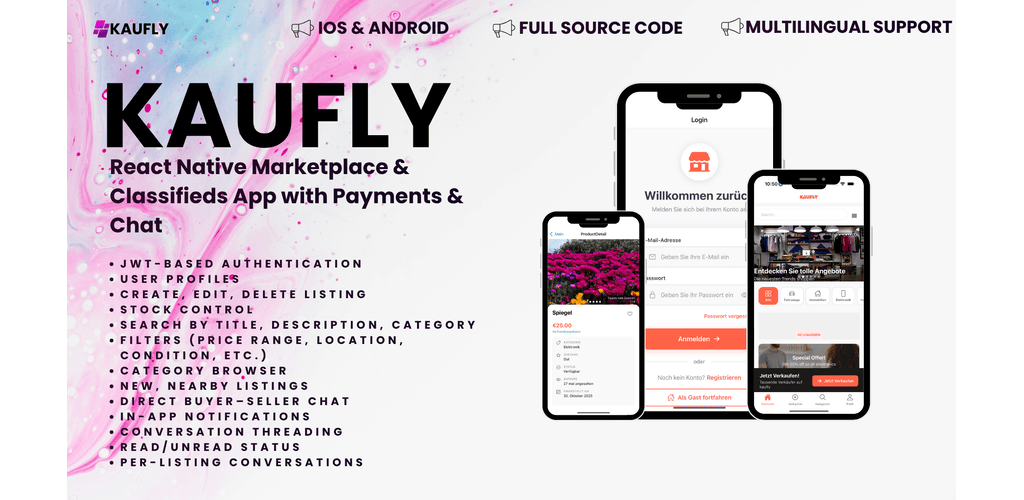
KAUFLY provides a complete marketplace experience tailored for buyers and sellers. Core capabilities include:
Download Here
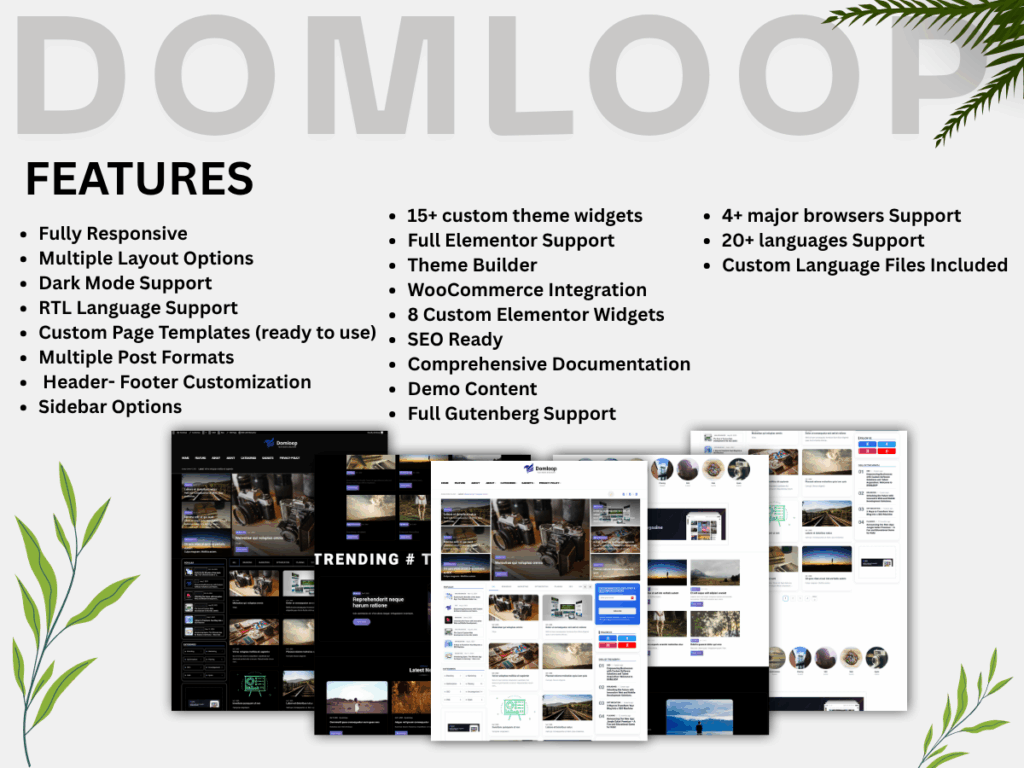
Choosing the right WordPress theme is one of the most important steps in building a successful website. For creatives, photographers, bloggers, and businesses looking for a visually appealing yet lightweight design, the Pexels WordPress Theme stands out as a modern and elegant solution.
The Pexels WordPress Theme is a clean, minimalist WordPress theme inspired by modern design trends and high-quality visual layouts. It is designed to highlight images, content, and branding while maintaining excellent performance and usability. The theme is ideal for portfolios, blogs, creative agencies, and media-rich websites.
One of the key strengths of the Pexels theme is its visual-first approach. With spacious layouts, smooth typography, and balanced white space, the theme ensures that images and content remain the main focus. This makes it especially suitable for photographers, designers, and content creators who want their work to stand out.
The Pexels WordPress Theme is fully responsive, ensuring a seamless browsing experience across desktops, tablets, and mobile devices. As mobile traffic continues to grow, this responsiveness helps websites maintain strong user engagement and accessibility on all screen sizes.
Performance plays a major role in user experience and search engine rankings. The Pexels theme is built with clean code and optimized assets, resulting in fast loading times. Its SEO-friendly structure helps search engines better understand and index your content, giving your website a strong foundation for organic visibility.
The theme offers flexible customization options through the WordPress Customizer. Users can easily adjust colors, fonts, layouts, and header styles without needing advanced coding knowledge. This makes the Pexels WordPress Theme a great choice for both beginners and experienced developers.
The Pexels theme works smoothly with popular WordPress plugins such as:
This compatibility allows users to extend their website’s functionality without limitations.
The Pexels WordPress Theme is perfect for:
Its flexibility makes it adaptable to a wide range of industries and content styles.
The Pexels WordPress Theme is an excellent choice for anyone looking for a modern, lightweight, and visually engaging WordPress theme. With its responsive design, strong performance, and easy customization, it provides a solid foundation for building professional websites that look great and perform even better.
If you’re searching for a theme that balances aesthetics and functionality, the Pexels WordPress Theme is definitely worth considering.
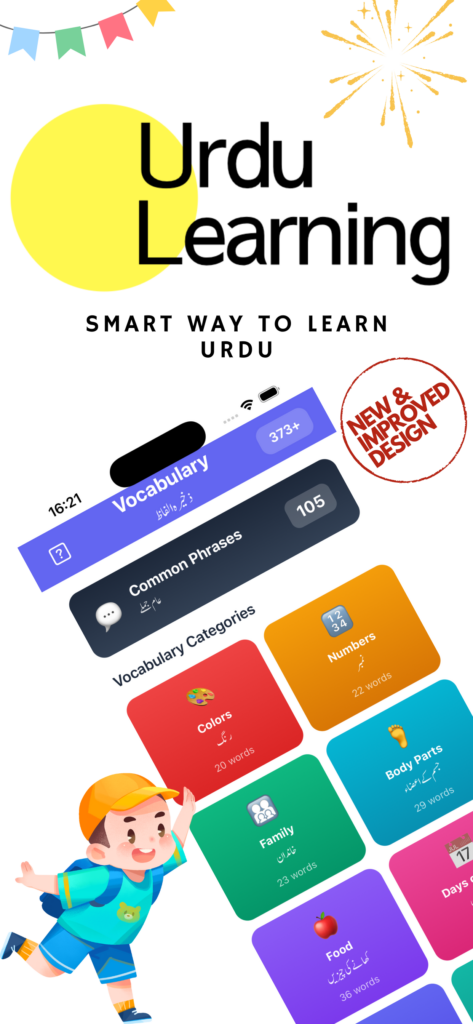
In today’s digital world, learning a new language has become easier and more accessible than ever. Recognizing the growing demand for regional and cultural language learning, Domloop Solutions has developed a powerful Urdu Learning Mobile App for iOS and Android designed to help users learn Urdu in a simple, interactive, and effective way.
Urdu is a beautiful and expressive language spoken by millions around the world. However, learning it can be challenging without the right tools. The Urdu Learning Mobile App bridges this gap by offering structured lessons that focus on reading, writing, and speaking Urdu, all from the convenience of a smartphone.
The app is designed for beginners as well as learners who want to improve their existing skills. With a clean interface and easy navigation, users can progress at their own pace without feeling overwhelmed.
The app includes a wide range of features that make language learning engaging and practical:
Each feature is carefully designed to ensure a seamless learning experience for users of all age groups.
Built using modern mobile development technologies, the app delivers consistent performance across iOS and Android platforms. Whether users are on an iPhone or an Android device, they enjoy the same high-quality interface, fast loading times, and reliable functionality.
At Domloop Solutions, we specialize in building innovative, user-centric mobile applications. Our focus on design quality, usability, and performance ensures that every app we develop meets modern standards and user expectations. The Urdu Learning Mobile App reflects our commitment to delivering educational solutions that are both functional and visually appealing.
One of the biggest advantages of the Urdu Learning Mobile App is flexibility. Users can learn Urdu anytime and anywhere—whether at home, during travel, or in their free time. This makes the app an ideal choice for students, professionals, and language enthusiasts worldwide.
The Urdu Learning Mobile App for iOS & Android by Domloop Solutions is a complete digital solution for anyone looking to learn or improve their Urdu language skills. With its intuitive design, structured lessons, and cross-platform compatibility, the app makes learning Urdu easier, faster, and more enjoyable.
If you are looking for a reliable and modern language learning application, this app is the perfect place to start.
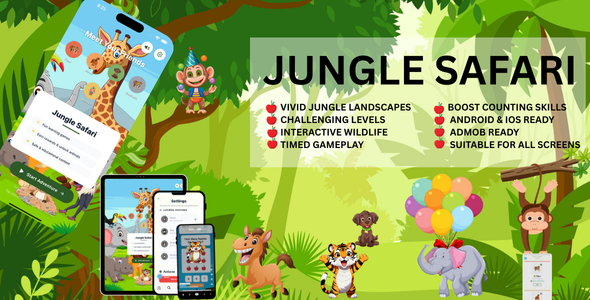
Mobile applications have transformed the way people explore, learn, and experience the world around them. Keeping this in mind, Domloop Solutions has developed the JungleSafari Mobile App for Android & iOS, an engaging and feature-rich application designed to bring the thrill of wildlife and jungle exploration right to users’ fingertips.
The JungleSafari Mobile App offers users an immersive experience inspired by nature, wildlife, and adventure. Whether the app is used for educational purposes, entertainment, or exploration planning, it delivers a smooth and visually appealing experience across both Android and iOS platforms.
With intuitive navigation and a modern user interface, users can easily explore app features while enjoying a seamless digital safari journey.
The JungleSafari Mobile App is packed with features designed to enhance user engagement and usability:
Each feature is carefully crafted to ensure a high-quality user experience.
Developed using modern mobile technologies, the JungleSafari app ensures consistent performance across Android and iOS. Domloop Solutions focused on delivering a scalable and efficient solution that meets today’s mobile standards while remaining flexible for future enhancements.
Domloop Solutions is a trusted name in mobile app development, known for delivering innovative, high-performance digital solutions. The JungleSafari Mobile App reflects the company’s commitment to creativity, quality, and user-centered design.
The JungleSafari app is ideal for users who love nature, wildlife, and adventure. It combines education and entertainment in a single platform, making it suitable for a wide audience, including students, explorers, and nature enthusiasts.
The JungleSafari Mobile App for Android & iOS by Domloop Solutions is a powerful example of how technology can create engaging and immersive experiences. With its modern design, smooth functionality, and cross-platform compatibility, the app delivers a compelling safari-inspired experience for mobile users.
If you’re looking to build an engaging mobile app with rich visuals and seamless performance, Domloop Solutions has the expertise to bring your idea to life.

Top Cloud Hosting Platforms offer developers, startups, and businesses scalable, secure, and high-performance environments for their applications. The top cloud hosting platforms in 2025—such as AWS, Google Cloud, Microsoft Azure, Cloudways, and Kinsta—provide flexible infrastructure, automatic scaling, and powerful tools for deployment and monitoring. Choosing among the top cloud hosting platforms depends on your project’s needs: AWS and Google Cloud excel in scalability, Cloudways and Kinsta shine in managed hosting simplicity, and Azure integrates perfectly with enterprise systems. For developers seeking reliability and performance, investing in one of the top cloud hosting platforms ensures smooth app management, faster load times, and strong security.
As a developer, you often want to focus on writing code, shipping features, and iterating — not babysitting servers, patching kernels, or troubleshooting infrastructure issues.
However, it also means you trade some “bare metal control” (low-level tweaks) for convenience, and the cost is typically higher than unmanaged or DIY cloud servers.
Although public cloud providers eliminate the need for companies to manage physical, on-site infrastructure, organizations still need expertise to set up and maintain the cloud environment.
Managed hosting is a service where a third-party provider takes care of setting up, administering, managing, and supporting servers and applications. This often covers tasks such as operating system updates, patch management, round-the-clock support, network and hardware maintenance, basic security protections like antivirus and spam filtering, as well as monitoring and optimizing performance.
By relying on a managed hosting provider, businesses can avoid the need to maintain in-house hosting specialists, much like outsourcing other business tools and services.
Cost and time efficiency: Small teams may lack the expertise or bandwidth to manage cloud services in-house, and hiring specialized staff can be costly. Using managed hosting allows businesses and developers to save both time and money by outsourcing cloud management to an experienced external team.
and last but not least….
Better performance and reliability: Managed hosting providers are experts in configuring cloud environments for maximum speed and dependability. They ensure your applications run optimally by selecting the right data centers, Content Delivery Networks (CDNs), and caching strategies, whether through managed dedicated hosting or other solutions.
WORDPRESS is a popular example of managed web hosting where hosting provider offer specialized services for web hosting that optimizes performance and security of this platform.Although “SECURITY” of WordPress platform could be a debate but we will talk some other day about it.
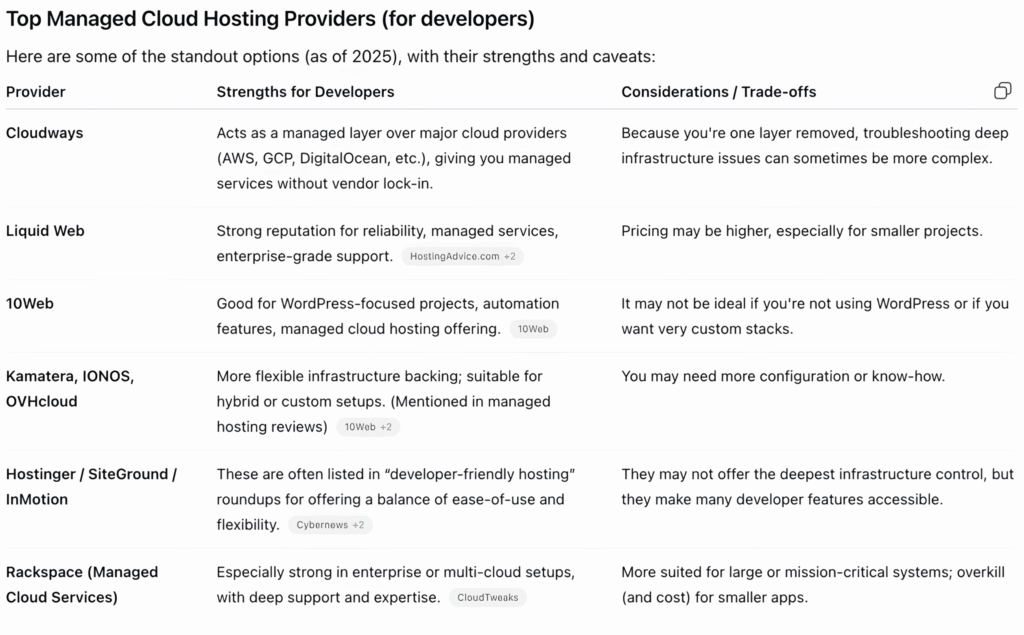
Cloudways operates as a management layer over major cloud providers like AWS, Google Cloud Platform, and DigitalOcean, delivering fully managed hosting services while ensuring you aren’t locked into a single vendor. It simplifies server setup, maintenance, and optimization, handling tasks such as automated backups, security monitoring, performance tuning, and scaling. With features like integrated caching, staging environments, and developer-friendly tools, Cloudways allows businesses and developers to focus on their applications rather than infrastructure management, providing flexibility, reliability, and efficiency across multiple cloud environments.
Liquid Web is highly regarded for its reliability, offering robust and comprehensive managed services that cater to a wide range of business needs. Its enterprise-level support is available 24/7, ensuring that any technical issues are addressed promptly by knowledgeable experts. Beyond basic hosting, Liquid Web provides advanced features such as managed security, automated backups, performance monitoring, and scalable infrastructure options. This combination of dependable service, proactive management, and premium support makes it a trusted choice for businesses seeking a hosting provider that can handle complex workloads while minimizing downtime and technical headaches.
If you are looking for ease of use,ui friendly and flexible hosting provider, these platforms are a must try.
These platforms frequently appear in “developer-friendly hosting” lists because they strike a strong balance between ease of use and technical flexibility. They provide intuitive interfaces, automation tools, and preconfigured environments that simplify deployment, while still offering developers the control and customization options needed for advanced workflows, testing, and scaling. This combination makes them a popular choice for both individual developers and teams managing complex projects.
Rackspace is particularly well-suited for enterprise environments or multi-cloud architectures, offering extensive support and specialized expertise. These platforms excel at managing complex infrastructures, ensuring high performance, security, and scalability, while providing guidance and hands-on assistance for businesses with demanding technical requirements.
Vendor Lock-in: Dont opt for more and more managed features.The more you get these facility, the difficult it will be for you to migrate from one platform to another.
Billing Burden: Sometimes expanding your website features, managing more traffic or an upgarde in your website can cost heavy billing and costs that you have not initially taken into consideration.
Management Limitation: Some Hosting providers may not give you full access to OS or Kernel level operation or tuning.
Custom web development is one of those purchases that sits at the intersection of strategy, design, and engineering. Because every build is different—industry, scope, traffic expectations, integrations, compliance needs—the price range can feel bewildering. In 2025, the U.S. market is still the world’s most mature (and pricey) place to hire web talent, but you also have more options than ever: local studios, distributed agencies, vetted networks, and global freelancers.
This guide demystifies the numbers. You’ll learn what typical projects cost in the U.S. this year, how agencies and freelancers price their work, where the big swings come from, and how to estimate a realistic budget for your situation—without overpaying or under-scoping.
TL;DR (ballpark ranges for 2025)
Basic marketing site (custom design + CMS, 5–10 pages): $8,000–$25,000 (4–10 weeks) Content-heavy site (custom design, CMS, search, multi-author workflows): $25,000–$80,000 E-commerce (catalog, cart, payments, tax/shipping, basic ERP/CRM hooks): $40,000–$150,000 Web app / SaaS MVP (auth, dashboards, role-based access, payments, API): $80,000–$300,000+ Enterprise/regulated (HIPAA/PCI/SOC 2, complex integrations, high availability): $150,000–$1M+
Those ranges reflect U.S. rates, typical timelines, and a mix of design + development + project management + QA. They align with what clients report paying on large agency directories and review platforms this year. For example, Clutch’s pricing guide shows an average web development project cost around $66.5k based on verified client reviews, with multi-month timelines common for full builds.
Why prices vary so much
Three forces drive most of the spread:
Scope & complexity. Every custom feature—multi-variant product logic, tiered subscriptions, custom search, real-time updates—adds hours for architecture, coding, and QA. Multiply by platforms (web + native), locales, and SSO/ERP/CRM integrations, and the scope compounds quickly. Talent model. Agencies package strategy, UX, engineering, QA, and PM. U.S. shops often quote $25–$150+ per hour (and more at the top end), driven by their overhead and senior staffing. Clutch’s U.S. web development company pricing spans widely; many firms list bands such as $25–$49/hr on the low side, while web design specialists commonly show $100–$149/hr. Freelancers/independents are cheaper but require you to coordinate roles. On big marketplaces, web developers frequently list $15–$50/hr; experienced software developers can charge $70–$150+ (and sometimes much more). Vetted networks (e.g., Toptal and similar) curate senior talent and add platform margin; expect $60–$150+ per hour (often higher for niche expertise). Total cost of ownership (TCO). Hosting, observability, security tooling, and ongoing maintenance easily add 10–25% annually after launch. Even modest cloud infrastructure (e.g., managed VPS + managed database) can run $20–$100+/mo per environment; highly available, multi-region architectures are more. For instance, AWS Lightsail bundles start at $3.50/mo for small Linux instances and managed databases start at $15/mo for 1 GB plans—fine for prototypes, not for heavy traffic.
How U.S. labor rates translate into project prices
To understand quotes, it helps to anchor on current U.S. market compensation and bill rates:
The U.S. Bureau of Labor Statistics reports a median annual wage of $133,080 for software developers (May 2024), before benefits and overhead—one reason U.S. bill rates stay high. On freelance platforms, web developers often charge $15–$50/hr, while broader “software developer” categories span $10–$100+, with senior specialists higher. Agency directories show many web development firms listing $25–$49/hr (often offshore or blended teams) and web design firms commonly at $100–$149/hr (strategy-heavy studios in major U.S. cities).
A simple conversion:
What you actually pay for (line-item anatomy)
Discovery & architecture (5–15%): business goals, user journeys, technical architecture, backlog. Design (15–30%): wireframes, visual system, components, Figma library, accessibility specs. Front-end engineering (25–40%): component development, responsive layouts, performance. Back-end engineering (20–35%): CMS/custom logic, API design, data modeling, auth/roles. Integrations (0–20%): payments, tax/shipping, CRM/ERP, SSO, search, analytics, marketing tools. QA & accessibility (5–15%): cross-browser/device testing, automated tests, a11y conformance. Project management (5–15%): sprint planning, communication, risk and dependency handling. DevOps & hosting setup (2–10%): environments, CI/CD, observability. Content support (0–15%): migration, structured content modeling, editorial training.
The lower percentages fit simple marketing sites; the higher end fits complex apps or compliance-heavy builds.
Typical U.S. project scenarios (with budgets)
1) Modern marketing site (B2B)
Scope: 8–12 pages, custom design system, CMS (e.g., headless WordPress/Strapi), SEO basics, analytics, contact forms, gated content.
Team: PM (part-time), UX/UI designer, front-end dev, full-stack dev, QA.
Timeline: 4–10 weeks.
Budget: $8,000–$25,000 (freelancer/studio blend) or $25,000–$60,000 (U.S. agency with robust process).
Why it swings: Brand/UX depth, animations, content modeling, and stakeholder rounds.
2) Content-heavy site (media/nonprofit/education)
Scope: Dozens to hundreds of pages, rich taxonomies, search, multilingual, complex editorial workflows, SSO for staff/partners.
Team: Strategist, UX, design, multiple developers, DevOps, QA.
Timeline: 2–5 months.
Budget: $25,000–$80,000 (lean team) or $80,000–$200,000 (enterprise polish).
Why it swings: Migration complexity, search relevance tuning, permissions, and multi-environment setups.
3) E-commerce (DTC brand, custom storefront)
Scope: Catalog, variants, cart/checkout, taxes/shipping, discounts, CRM/ESP integrations, analytics, performance budget, accessibility, PCI-aware workflows.
Team: PM, UX/UI, front-end, back-end, QA, sometimes solution architect.
Timeline: 3–6 months.
Budget: $40,000–$150,000 (custom storefront on Shopify/BigCommerce/Medusa/etc.), higher with ERP/WMS integration.
Why it swings: Product complexity, multi-warehouse logistics, subscriptions, internationalization, content + commerce orchestration.
4) SaaS MVP / Web App
Scope: Authentication, role-based access, dashboards, CRUD, payments/subscriptions, event tracking, admin tools, API integrations.
Team: Product lead, UX, 2–4 engineers, QA/automation, DevOps.
Timeline: 3–6 months for a polished MVP.
Budget: $80,000–$300,000+
Why it swings: Data modeling, real-time features, complex business rules, security posture, HA/DR.
Reality check: Client-reported averages for “web development projects” cluster in the $50k–$100k region for multi-month efforts—again, consistent with directory data in 2025.
Hourly rates, day rates, and fixed bids
Hourly / Time & Materials (T&M). Flexibility to change scope; you pay for actual hours. Good when requirements are evolving.
Day rates. Common among senior freelancers/consultants; quick for workshops and audits.
Fixed price. Useful for well-defined scopes; expect a discovery phase first. Vendors include contingency in the price to absorb risk; if your scope grows, so does the price.
Where the market is in 2025:
Freelance web developers: $15–$50/hr median ranges on large marketplaces, with senior engineers for complex builds rising to $70–$150+. U.S. agencies: Many public listings show $25–$49/hr (often blended or near-shore teams) while design-forward studios list $100–$149/hr. Top-tier consultancies can exceed that. Curated networks (e.g., Toptal): Commonly $60–$150+ per hour depending on specialization and seniority.
Pro tip: Ask for the blended rate and the role mix (e.g., 15% PM, 20% design, 65% engineering). That makes apples-to-apples comparisons much easier.
Non-development costs you should plan for
Even a perfect codebase needs a home and upkeep. Budget for:
Hosting & infrastructure. Entry-level VPS or managed cloud plans start low (e.g., AWS Lightsail from $3.50/mo, managed DBs from $15/mo), but professional environments (staging + prod, CDN, WAF, backups, monitoring) add up—typically $50–$500+/mo for SMBs, much more for high traffic. Domains, SSL, email. Domains ~$10–$20/yr; TLS certificates are often free via Let’s Encrypt but managed services may charge. Third-party services. Search (e.g., Algolia), transactional email/SMS, feature flags, analytics, A/B testing, error monitoring, logging. $10s–$100s per month depending on volume. Maintenance & support. Expect 10–25% of build cost per year for updates, security patches, minor improvements. If your site is revenue-critical, consider a retainer with SLAs. Compliance & audits. Pen tests, SOC 2 readiness, HIPAA/PCI constraints—significant cost multipliers in enterprise settings.
The feature multipliers (what makes quotes jump)
Custom design system & motion. Bespoke design with polished micro-interactions can add 20–40% to design + front-end hours. Performance budgets. Achieving sub-1s LCP on mobile at scale demands careful architecture, image/CDN strategy, and profiling time. Accessibility (beyond checkbox). AA/AAA conformance, keyboard/AT testing, semantic audits—budget explicit time for a11y. Localization & multi-region. Translation management, locale-specific content, currency/tax rules, and CDNs add both build and ops cost. Complex integrations. ERP, PIM, WMS, CRM, accounting, SSO (SAML/OIDC), marketplace APIs—all can dominate timelines. Data & reporting. Custom analytics pipelines or embedded BI dashboards require data modeling and governance. Security posture. Threat modeling, WAF rules, KMS/HSM, secrets management, and periodic security testing add line items but lower long-term risk.
Build options in 2025 (and what they cost)
1) Website builders (Wix, Squarespace, etc.)
Subscription ~$21–$26/month plus domain; fastest to launch, least flexible. Great for MVP landing pages; limited for complex content models or custom logic.
2) CMS-based (WordPress, headless CMS)
“Free” core with paid hosting, themes/plugins; typical SMB hosting $10–$50+/mo plus managed services. Excellent for content-heavy sites; still requires engineering for custom features.
3) Fully custom (frameworks, microservices, custom APIs)
High flexibility, highest engineering cost. Expect $5,000–$30,000+ for simple custom-coded sites and much more for apps. (Consumer tech media guides echo these bands for “custom-coded” sites; serious apps exceed them.)
How to estimate your project (a practical worksheet)
Step 1: Clarify outcomes, not features. What problems must the site/app solve in the first 90 days post-launch? Rank goals (e.g., demo bookings, trials, conversions, content publishing velocity).
Step 2: Translate goals into scope.
Pages/templates (count unique layouts) Integrations (payments, CRM, auth, search) Roles/permissions Must-have performance/a11y benchmarks Content migration requirements Admin/editor capabilities
Step 3: Size the build in hours (rough cut).
Small marketing site: 150–300 hours Content-heavy: 300–800 hours E-commerce: 400–1,000 hours SaaS MVP: 600–2,000 hours Multiply by a blended rate that fits your vendor type (e.g., $80, $120, $160 per hour).
Step 4: Add 15–25% for unknowns. Assumptions will change; your budget should, too.
Step 5: Add year-one TCO. Hosting + tools + maintenance retainer (often 10–25% of build cost).
Example:
You scope a SaaS MVP at 900 hours. You shortlist a U.S. boutique agency quoting $120/hr blended.
Build: 900 × $120 = $108,000 Contingency (20%): $21,600 Year-one ops (tools + hosting + maintenance retainer @ 15% of build): $16,200 Year-one total: ~$145,800
Cross-check that against market signals: multi-month web projects often land in the ~$50k–$100k median range; MVP apps commonly exceed that.
Freelancer(s)
Pros: Lowest cost; direct communication; flexible engagement. Cons: You manage gaps (PM, QA, design); single-point-of-failure risk; bandwidth constraints. Best for: Clear scope, smaller builds, extensions to an in-house team. Typical 2025 rate: $15–$50/hr for general web development on large platforms; specialists command more.
Agency (U.S.-based or blended)
Pros: Cross-disciplinary team; proven processes; easier scaling; accountability. Cons: Higher rates; potential for over-process on small projects. Best for: Multi-stakeholder projects, brand-critical websites, regulated environments. Typical 2025 rate: Listings frequently show $25–$49/hr for development firms (often blended teams) and $100–$149/hr for design-centric studios.
Vetted network (e.g., Toptal-style)
Pros: Senior talent, quick replacement, quality bar. Cons: Platform margin; higher effective rate. Best for: “Need a senior yesterday” scenarios; niche stacks. Typical 2025 rate: $60–$150+/hr depending on specialization.
Even with remote work, U.S. geography still nudges rates:
Major hubs (SF, NYC, Boston): highest salaries → higher bill rates. Secondary markets / distributed teams: more moderate. Blended teams (U.S. strategy + nearshore/offshore engineering): can bring the blended rate down while keeping timezone overlap and senior oversight.
Government data reflects the broader story—U.S. software developers have high median wages (again, $133k median), which flow into agency pricing.
Red flags and cost traps
Vague scope / “we’ll figure it out later.” Without at least a backlog and success metrics, you’re funding aimless hours. Insist on a discovery sprint with artifacts (user flows, prioritized backlog, architecture outline). No dedicated QA. Testing “by developers” alone invites regression costs later. Proprietary lock-ins. If a vendor insists on non-portable frameworks or closed CMSes, request exit and IP terms in writing. Unmetered integrations. “Connect to our ERP/CRM” can swing hundreds of hours depending on API maturity and business rules. Cap and phase integrations. Security and compliance as afterthoughts. Retrofits cost multiples of building it right (least privilege, secrets mgmt, audit logging, backups, role separation).
Saving money without sabotaging quality
Phase the build. Launch a “version that matters” in 8–12 weeks; backlog the rest. Reuse components. Adopt a design system and component library; customize where it counts (hero, nav, product cards). Choose “boring” tech. Proven stacks minimize surprises and hiring risk. Leverage managed services. Use managed auth, search, payments, and infrastructure where sensible; small monthly fees beat reinventing the wheel. See, for instance, entry-level Lightsail bundles and managed DBs for small apps. Invest in content modeling. Good content structure reduces future dev costs (fewer one-off templates and hacks). Insist on observability. Logs, metrics, and error reporting save time during incidents, lowering unplanned cost.
What a transparent proposal should include
Discovery scope & deliverables. Exactly what you get before build starts. Assumptions & exclusions. Dependencies, “out of scope” list, and third-party costs. Detailed work plan. Milestones, sprints, demos, acceptance criteria. Team & blended rate. Who’s doing what, seniority, and their % allocation. Testing & QA plan. Manual + automated coverage expectations. Security & compliance posture. Data handling, credentials, backups, SLAs. Post-launch support. Bug-fix window, retainer options, response times. IP & exit terms. Repository ownership, handover artifacts, documentation.
If you don’t see those elements, ask. The best vendors welcome specificity.
Sample budgets you can adapt
Budget: $20,000 (high-quality marketing site)
Discovery & IA: $3,000 Design system & templates: $6,000 Front-end + CMS integration: $8,000 QA & accessibility sweep: $2,000 Launch/ops setup: $1,000 Hosting & tools (annual): $600–$1,500+
Budget: $75,000 (content-heavy site with search + migration)
Discovery & architecture: $8,000 Design system, components, editorial workflows: $18,000 Front-end: $18,000 Back-end/CMS/custom roles: $18,000 Integrations (search, CRM): $6,000 QA/automation: $4,000 DevOps & launch: $3,000 Ops (annual): $2,000–$8,000+ depending on traffic and tools.
Budget: $180,000 (SaaS MVP)
Product discovery & UX research: $18,000 Design & prototyping: $24,000 Full-stack engineering (core features): $100,000 Payments/subscriptions + analytics: $10,000 QA & security hardening: $12,000 DevOps (CI/CD, monitoring): $8,000 Launch & runway improvements: $8,000 Ops (annual): $8,000–$25,000+ based on scale and redundancy needs.
Cross-check these with your vendor’s rate card and directory benchmarks (e.g., multi-month web projects averaging ~$66.5k per client reviews).
FAQs (2025)
Is the market cheaper this year because of remote/offshore talent?
Blended models have kept some quotes competitive, but U.S. senior talent remains expensive (high median wages), and specialized work—security, performance, complex integrations—still commands premium rates.
Can I do this with a website builder for a fraction of the cost?
For simple marketing needs, yes—many businesses thrive on builders at ~$21–$26/month plus a domain. But once you need custom data models, workflows, or integrations, a CMS or custom stack becomes more economical long-term.
What should I budget for hosting?
Small sites: tens of dollars per month. Apps with higher traffic or uptime needs: hundreds to thousands. As a reference point, Lightsail instances start at $3.50/mo and managed DBs at $15/mo, but serious production workloads usually require more robust (and costly) setups.
How do I compare agency proposals fairly?
Ask for:
(1) a task breakdown with hours,
(2) role mix and a blended rate,
(3) assumptions/exclusions, and
(4) QA/devops details. Normalize on hours × blended rate to compare apples to apples.
What about ongoing maintenance?
Plan on 10–25% of the initial build for year-one improvements, updates, and support. This is standard across professional vendors; it protects your investment.
The bottom line
In 2025, custom web development in the U.S. most often lands between $25k and $150k for full professional builds, with MVP apps frequently $80k–$300k+. Your scope, talent model, and TCO (hosting + tools + maintenance) determine where you land. To control cost, phase ruthlessly, favor “boring” tech, and insist on clear deliverables and role mixes in proposals. Use market anchors: client-reported project averages (~$66.5k), freelance ranges ($15–$50/hr common, specialists higher), agency listings ($25–$49/hr and $100–$149/hr bands), and cloud baselines (e.g., Lightsail $3.50/mo instances, $15/mo managed DBs).
If you take nothing else away: define outcomes, constrain scope, and buy the right level of expertise for the job. That’s how you get a high-performing site or app at a fair 2025 price.
Here is a comparison of The cost of custom web development in USA
Experience a Seamless Relocation to Germany with the XPATS App – Now Available on the Play Store and App Store
Relocating to a new country can be a life-changing opportunity, but it comes with its share of challenges—navigating complex visa processes, finding the right job or school, and getting accustomed to a new culture. To make this journey easier, we’re excited to announce the launch of our Xpats app, designed specifically for those looking to relocate to Germany. Available now on both Android and iOS, Xpats is the ultimate all-in-one solution for visa consultation and relocation services.
Download Now:
When it comes to moving abroad, preparation and the right support are key. Xpats has been carefully crafted to guide you through each step of your relocation journey to Germany, from the visa application process to settling comfortably in your new home. Here’s why you should download Xpats today:
Whether your goal is to study, work, or visit Germany, the visa application process can be confusing and overwhelming. Xpats takes the guesswork out by providing step-by-step assistance for various types of visas:
Our app ensures you have all the necessary information, documents, and guidance to submit a flawless application.
Germany has stringent requirements when it comes to document submission. If your documents need translation or notarization, Xpats offers quick and reliable services to ensure everything meets German standards.
Navigating communication with German authorities can be intimidating, especially for newcomers. Xpats bridges this gap by helping you manage official correspondence, arrange appointments, and understand essential paperwork, so you can focus on settling into your new environment stress-free.
Finding a job in a foreign country can be tough without the right resources. With Xpats, you’ll gain access to tailored job offers, career guidance, and support for crafting resumes that resonate with German employers. We’re here to ensure your job search is both effective and efficient.
For students, moving to a new country means choosing the right educational institution. Xpats provides an extensive directory of schools, colleges, and language courses to help you find the perfect fit for your academic goals.
Mastering the German language is essential for integration and career advancement. Whether you’re a beginner or at an advanced level, Xpats offers recommendations for top-rated language schools and courses to boost your proficiency and confidence.
The first day in a new country can be the most stressful. That’s why Xpats offers seamless airport pick-up services, so you can land in Germany knowing your transportation is sorted. Start your journey on the right foot without worrying about navigating local transit immediately.
Getting started is simple! Just follow these steps:
Moving to Germany offers endless opportunities, but only if you have the right tools to navigate the relocation process. Xpats is the game-changer you’ve been waiting for—a trusted partner that provides all the visa, documentation, and relocation support you need in one place. With thousands of satisfied users already making successful moves with our guidance, it’s time you join them and make your journey smoother and more exciting.
Don’t let paperwork, language barriers, or logistical challenges hold you back from your dream. Download Xpats today and step confidently into your future in Germany.
Your new life in Germany starts with Xpats.

© 2023 — Domloop Inc. All Rights Reserved.